

This page is also available in Arabic.
What it does
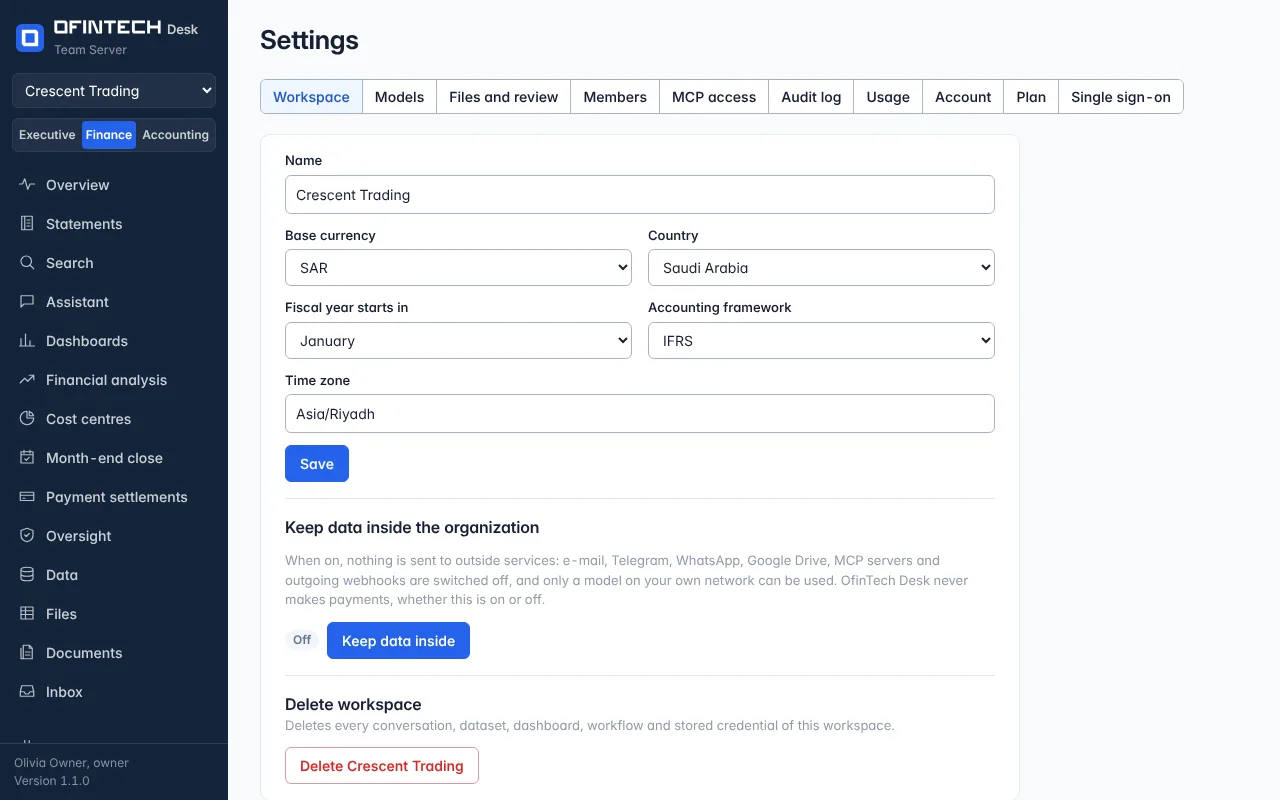
Settings holds what the workspace is: base currency, the month the fiscal year starts, the accounting framework, the country (some features follow it — the VAT return is prepared for Saudi workspaces). It holds the people: who is a member, in which role, and which sections each of them can open. And it holds the models: bring your own key for any provider or run models locally with Ollama or LM Studio, with a default model and a smaller one for short jobs.
Why it is there
The assistant's answers depend on these choices — which currency a figure is in, which month a year starts — so they are set once, by an administrator, in one place.
When to open it
- When the workspace is created
- To invite a colleague, and choose which sections they can open
- To change the model, or add a key
- To keep data inside the organization
How it works
Members is where people are invited, and where the workspace's owner and administrators decide what each of them can open. A viewer or an editor is given every section, or only the ones ticked — the Overview, the statements, the general ledger, the close, the VAT return and the rest, eighteen in all. A section that is not ticked is not in that person's menu, its address says it is not open to them, the server refuses its data, and the assistant does not use that section's tools on their behalf. The role still decides whether a person reads or edits. Owners and administrators always have every section, and the Inbox, Settings and Support are nobody's section: every member has them. Sections decide which parts of the workspace a person can open, not which rows they see — someone given Dashboards can chart any dataset in the workspace.
Keep data inside the organization switches off everything that leaves: e-mail, Telegram, WhatsApp, Google Drive, MCP servers and outgoing webhooks, and allows only a model on your own network. OfinTech Desk never makes payments, whether this is on or off. A server administrator can set it for the whole server. Deleting a workspace deletes every conversation, dataset, dashboard, workflow and stored credential in it, and cannot be undone.
A scenario
A bank's finance team must not send data outside. The workspace owner turns on keep data inside the organization, points the default model at the bank's own Ollama server, and the assistant keeps working with nothing leaving the building.
Steps
Set the basics
Currency, fiscal year, framework, country, time zone.
Invite people
A role for each; for a viewer or an editor, every section or only the ones you tick.
Choose the models
A default and one for short jobs; your own key or a local model.
Questions
A colleague says a page is not open to them.
An owner or an administrator opens Settings, Members, and Change sections on that person's row. The change applies to what they do next; nobody has to sign in again.
Can a section be closed to an administrator?
No. Sections apply to viewers and editors. An administrator can change everybody's sections, so closing one to them would mean nothing.