

This page is also available in Arabic.
What it does
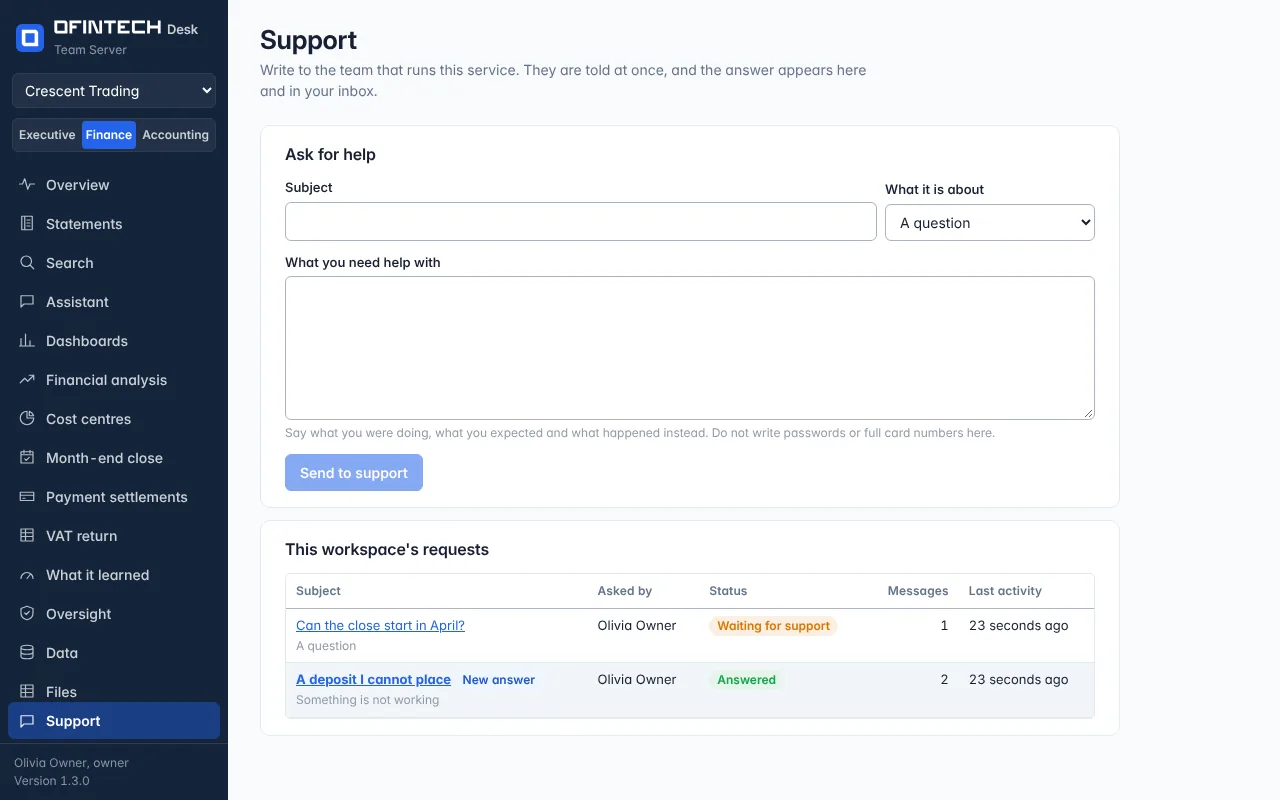
Support is a page in every workspace where a member writes to the people who run the service: a question, something that is not working, the plan and its invoices, or anything else. A request is a conversation. Whoever answers it is told the moment it is written, and it is counted beside Support in their own dashboard within seconds. The answer appears on the same page, with a line in your inbox and — unless you have turned that kind of e-mail off — an e-mail saying an answer is waiting.
Why it is there
The moment something stops working is the moment to be able to say so, to a person, from where you are. A request carries what that person needs in order to begin: who wrote it, from which workspace, and the page it was written from.
When to open it
- When a figure, an import or a page does not do what you expected
- With a question about the plan or an invoice
- When you are not sure which page does what you need
How it works
Write a subject, choose what it is about, and say what you were doing, what you expected and what happened instead. A request is Waiting for support until it is answered and Answered after that; either side can close it, and writing in a closed request opens it again. A request is words only: there are no attachments, and it is the wrong place for a password or a full card number.
You see the requests you wrote. The workspace's owner and administrators see all of the workspace's requests, so a problem a colleague has already reported is not reported twice. Nobody in another workspace sees any of them.
Support is open to every member whatever sections they have been given, and it goes on answering when a workspace has been made read-only or suspended. Reading a request does not let the person answering it into the workspace. To look at its data they must take support access, which is read-only, limited in time, written in the workspace's audit log and told to its administrators.
On a server your organization runs itself, a request goes to that server's administrators and to nobody else. The desktop app is for one person on one computer, so it has nobody to write to.
A scenario
An accountant imports a bank statement and one deposit will not match. She opens Support from the menu, writes what she tried and goes back to work. Later the inbox shows a line: support has answered. The answer asks which bank; she replies on the same page, and when the deposit matches she closes the request herself.
Steps
Write the request
A subject, what it is about, and what happened.
Read the answer
It appears on the same page, with a line in your inbox.
Reply, or close it
Write again if it is not solved; close the request when it is.
Questions
Who reads what I write?
The people who run the service — on a server your organization runs itself, that server's administrators — and, in your workspace, its owner and administrators. A colleague who is a viewer or an editor sees only their own requests.
Can support see my workspace's data when I write?
No. A request is the conversation and nothing else. Looking at a workspace's data takes support access, which is read-only, limited in time and written in the workspace's audit log.
How soon is it seen?
It is counted in the dashboard of whoever runs the service within a few seconds, and they are alerted there and by e-mail. When a person answers is up to them, not to the software.