

This page is also available in Arabic.
A payment company does not pay you a sale. It pays you a payout: many sales, less its fees, less refunds and disputes, less whatever it is holding back, on a day of its choosing. The bank statement shows only the payout. This is how to tie the two together for a month, with no till in between.
It needs the Pro or Enterprise plan and works in any country. Amounts are read in the workspace's own currency, with as many decimals as that currency has.
Steps
Export the provider's report
The one with a row for every sale, refund and fee, and the payout each belongs to. From Stripe, the itemized payout reconciliation report; from Adyen, the settlement details report; from Shopify, the transactions export of the Payouts page; from PayPal, the activity download with every column.
Check the file, then import it
Payment settlements, then Import, then the provider's settlement or payout report. Before anything is stored the page shows the payouts it put together, what each kind of row came to, and how many rows it left out and why — a row not in a payout yet, a row in another currency. The first report adds its provider.
Import the bank statement
The same way: checked first, then imported. A statement that writes 1.234,56, or puts the month before the day, is read as it is written; a header the page does not know is mapped once and remembered.
Prepare a run
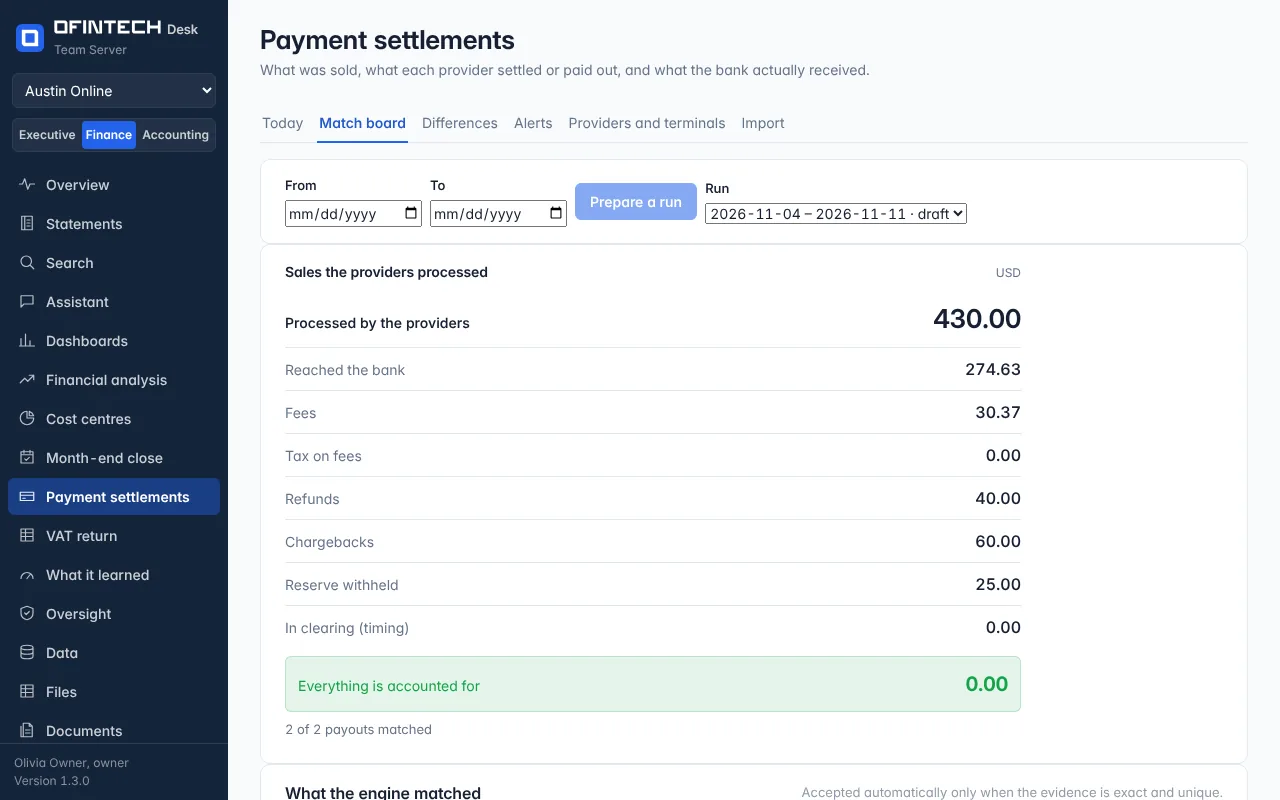
Match board, choose the dates, Prepare a run. Each payout is matched to the deposit that paid it. An exact match with no rival is accepted; anything less certain waits for you.
Read the statement at the top
Sales the providers processed, then every reason they are not all in the bank: fees, the tax on them, refunds, chargebacks, reserve withheld, other movements of the provider's balance, and what is still on its way. The last line is what nobody could name, and it should be nothing.
Decide and export
Explain or link what is open under Differences, then export the journal and the evidence pack. Nothing is posted to your accounting system.
Questions
My provider is not one of the four. Can I still use it?
Yes. Import its report, and if it has one row per sale rather than one per settlement, choose the column that says what each row is and the column that names its payout. The page reads it as payouts and remembers the shape.
Some rows are in another currency. What happens to them?
A workspace keeps its books in one currency. Rows in another are left out and counted on the import page, so the amount that was not read is in front of you.
What are other movements?
Money that moved in a payout and is not a sale, a fee, a refund, a chargeback or a reserve — a balance carried from one payout to the next, a top-up, a loan repayment. It is kept under that name so the payout still adds up to what the bank received.