

This page is also available in Arabic.
What it does
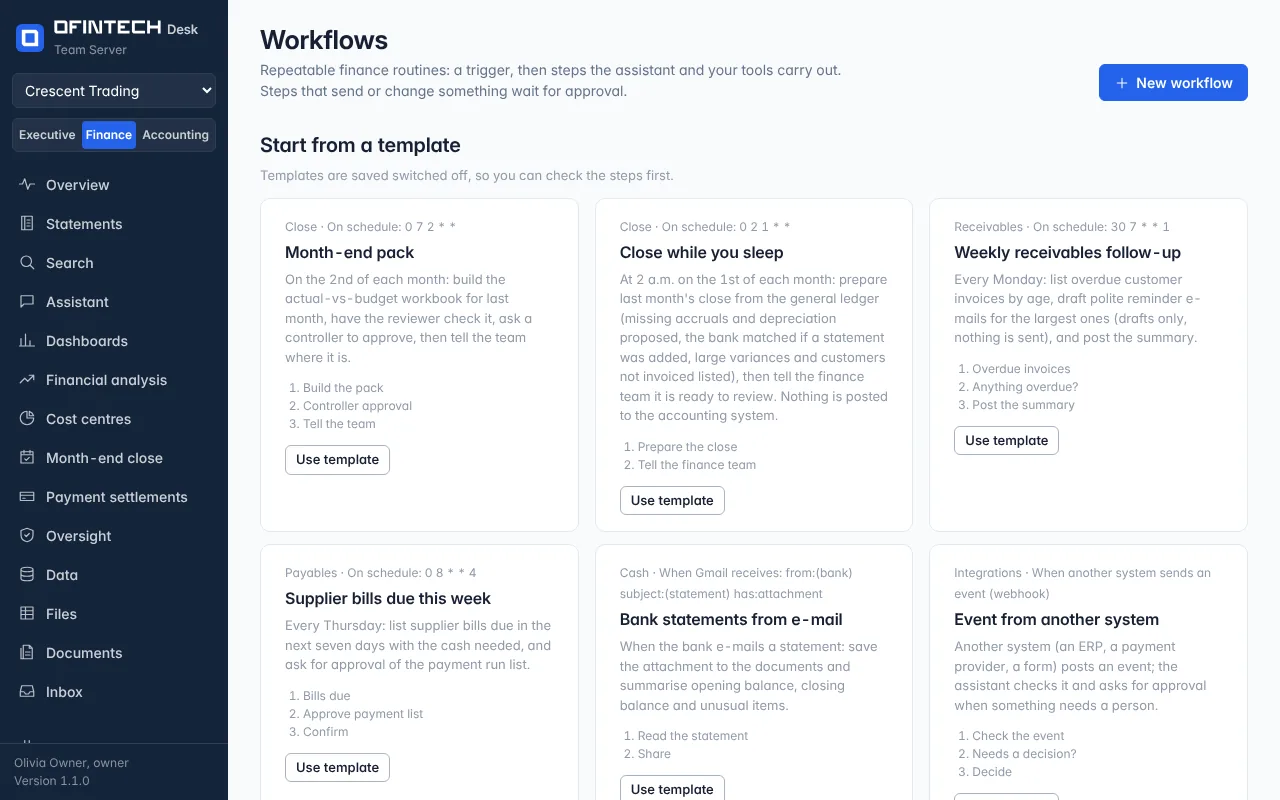
A workflow is a trigger — a schedule, an e-mail arriving in Gmail, a word sent in Telegram or WhatsApp, an event from another system — followed by steps: something for the assistant to do, a tool to call, a value to check, a file to edit, a message to send, a person to ask. Steps that send or change anything wait in the Inbox for approval.
Why it is there
The month has routines: prepare the close on the 1st, chase the three customers over 30 days, send the pack. Written once as a workflow, they run the same way every time and leave a record of each run.
When to open it
- To switch on the close-preparation template after checking its steps
- When a routine is done by hand for the third month running
- To see why a run failed and what it had done so far
How it works
Templates are saved switched off, so the steps can be read first. Schedules and e-mail triggers run only while the workflow is on. Each run lists its steps, their results and the approvals it waited for; the Connections page can send a test event to start one.
A scenario
Close while you sleep: at 2 a.m. on the 1st the workflow prepares last month's close and messages the finance team. The one step that would e-mail the pack to the CFO is an approval step, so the pack is sent only once a person has looked at it.
Steps
Start from a template
Read its steps; it is saved switched off.
Set the trigger
A schedule, an e-mail, a chat word or a webhook.
Switch it on
Schedules and e-mail triggers run only while it is on.