

This page is also available in Arabic.
What it does
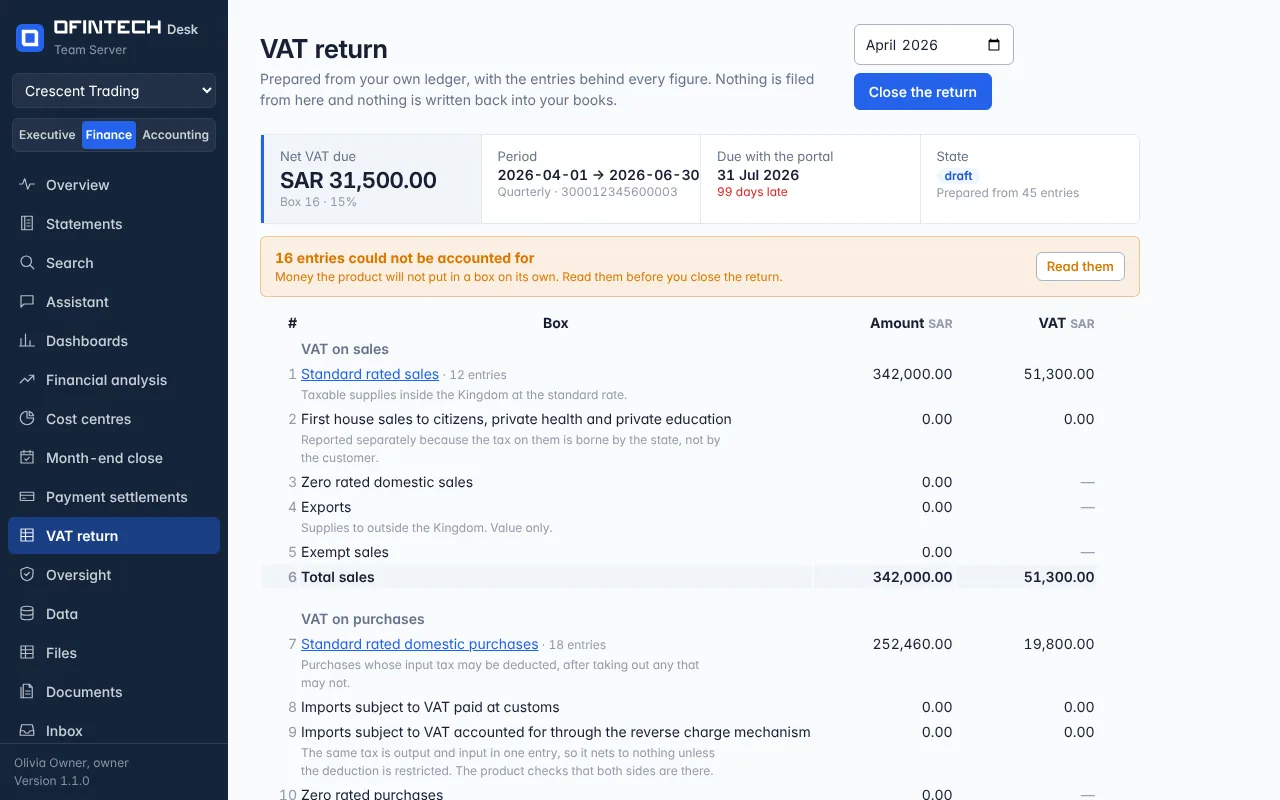
VAT return reads the general ledger for a tax period and writes your figures into the sixteen boxes of the Saudi return. A general ledger has no tax column, so the return is built from the movements on the accounts that hold the tax — the one output VAT is charged to and the one input VAT is paid into — and from the lines opposite them, which are the value of the supplies. Every box carries the number of entries behind it and opens into them.
Why it is there
The figures for a return already exist in the ledger. What takes a week is proving where each one came from. Here the question why is box 1 this number? is answered by the product, not by a spreadsheet somebody rebuilt from the ledger by hand and will have to rebuild again next quarter.
When to open it
- At the end of a tax period, to prepare the return
- Before the portal's deadline — the page carries the date and the days left, amber in the last week
- When a figure on a return already filed is questioned: open the closed return and follow the box to its entries
How it works
Say which accounts hold the tax. Until the output and input VAT accounts are named there is nothing to read, and the page says so rather than showing zeroes. Every account in your chart gets a suggested box and role, from words in its name in Arabic and English; you confirm or change them, and nothing is used until it is confirmed. A name that denies something — «مبيعات غير معفاة» — gets no suggestion at all, because a suggestion that looks confirmed is worse than none.
The period and its rate. Monthly above the forty-million-riyal threshold, quarterly below it. Each period is computed at its own rate: 5% before July 2020 and 15% after it, so an old period is not recomputed at today's rate.
What it will not guess. Four things are listed as unexplained entries for you to read rather than turned into figures: tax with no value beside it, a value with no tax where tax was expected, tax on a value that is not taxable, and a rate that differs from the period's. They sit above the form, with their count, because a draft with unexplained entries should not be read from the bottom up.
Closing. A closed return keeps the figures it was closed with: they do not change when the ledger behind them does. A later difference under 5,000 riyals belongs in the next return's corrections box; anything larger is an amendment of the return it belongs to, not a line in this one. A closed return prints — the boxes, the period and the registration number, and none of the buttons.
What it does not do
It does not file. Nothing is sent to any authority from here and nothing is written back into your books. The registration number you enter is printed on the return and is not checked with anybody, and the product is not connected to any tax authority's system. A person reads the return, files it, and remains responsible for it.
A scenario
A quarter comes to 1,450 riyals of output tax against 600 of input, so 850 is due. Two entries come back unexplained: a credit note posted without its tax, and a purchase billed at 5% that should have been 15%. Both are the kind of thing found in a letter a year later. Here they are found before the return is closed, and each one opens to the entry that caused it.
Steps
Say which accounts hold the tax
Settings → Accounts lists every account with a suggested box. Confirm the suggestions or change them; the output and input VAT accounts are the two the return cannot be read without.
Enter the registration number and the frequency
Fifteen digits, monthly or quarterly. The number is printed on the return and is not checked with anybody.
Choose the period
The month selector picks any period the ledger covers; the page names the period's start and end and the date it is due.
Read what could not be accounted for
Each one opens to the entry that caused it. They are money the product will not put in a box on its own.
Follow a box, then close the return
Select a box's label to see its entries. Closing keeps the figures as they are and prints them for the person who will file.
Questions
Does this file my return?
No. It prepares the return from your ledger and prints it; nothing is sent to any authority from here, and nothing is written back into your books. A person files it and remains responsible for it.
The page says there is nothing to read.
A general ledger has no tax column, so the return needs the two accounts that hold the tax to be named: the one output VAT is charged to and the one input VAT is paid into. Name them under Settings → Accounts.
A figure changed after I closed the return.
A closed return deliberately keeps the figures it was closed with. A difference under 5,000 riyals belongs in the next return's corrections box; anything larger is an amendment of the return it belongs to.
Monthly or quarterly?
Monthly for a business whose annual supplies are above forty million riyals, quarterly below it. The page uses the frequency you set, and says which period it is reading.