

This page is also available in Arabic.
What it does
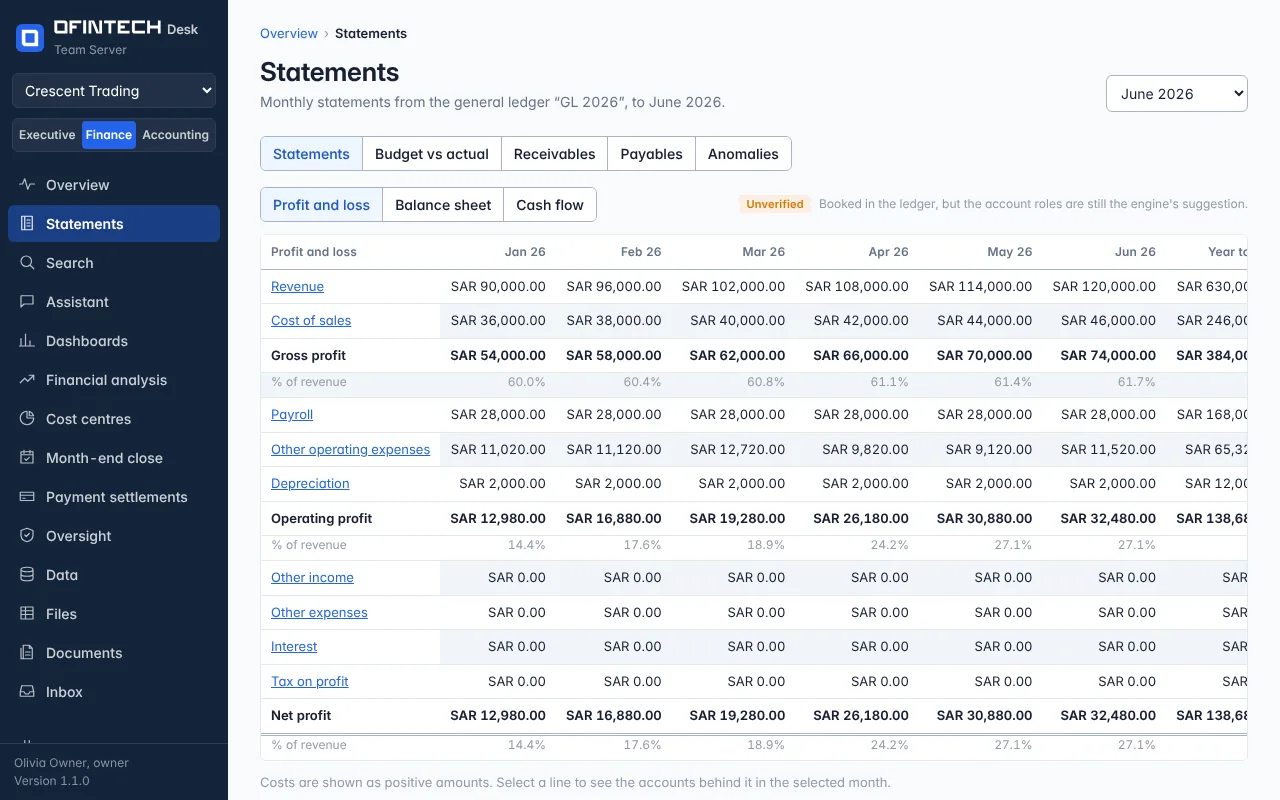
Statements builds the three financial statements from the general ledger for the period you choose: the income statement down to tax on profit, the balance sheet by current and non-current assets and liabilities, and the cash flow. Where a budget has been set, a budget vs actual view sits beside the actuals.
Why it is there
Statements exported from an accounting system are a picture of one moment. These are rebuilt from the journal lines every time, so a correction in the ledger is in the statements the next time you open them, and a line that looks wrong can be opened to the entries that made it.
When to open it
- At month end, with the close, to read the month as management will
- When a reviewer asks where a balance comes from
- To compare a quarter with the same quarter last year
How it works
Each line is a role — cost of sales, other operating expenses, short-term debt — and every account in the ledger has one. The engine suggests roles from the account names and classes; you confirm or change them under General ledger. An unusual amount flag marks a line whose month differs sharply from its usual level.
A scenario
Gross profit fell although sales rose. Opening the cost of sales line shows a supplier bill booked twice in the month. The duplicate is fixed in the source system, the ledger re-imported, and the statement is right without anyone editing a spreadsheet.
Steps
Pick the period
A month, a quarter, a year, or two periods to compare.
Open a line
Select a statement line to see the accounts and journal entries behind it.
Confirm the roles
If a line is empty or odd, check the account's role under General ledger.
Questions
Can I export the statements?
Ask the assistant for a workbook or a report of the period; it lands under Files with every figure traced to its source.