

This page is also available in Arabic.
What it does
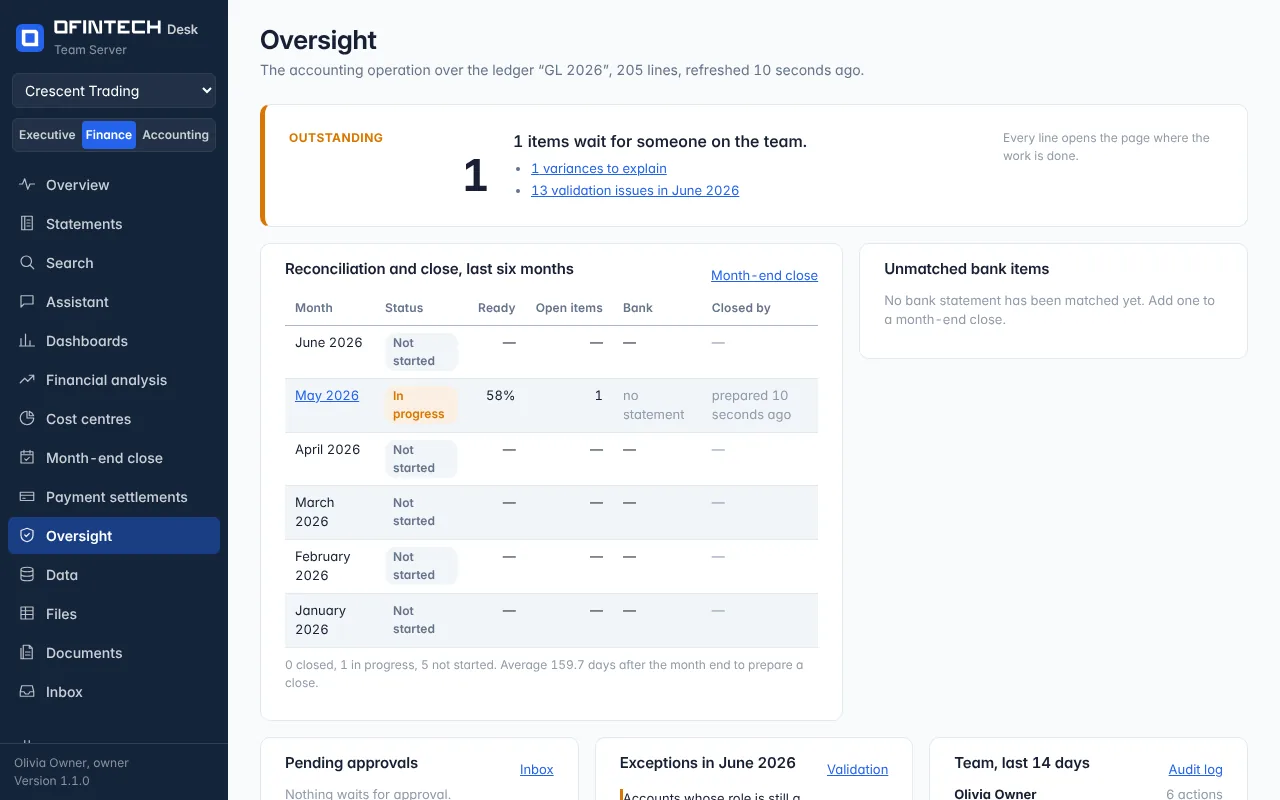
Oversight gathers what the other pages found and nobody has decided yet: accruals, depreciation entries, bank charges and interest entries to decide; bank items to review; variances to explain; customers not invoiced; and the ledger's own warnings — entries that do not balance, balances on suspense or clearing accounts, accounts whose role is still a suggestion, balances on the wrong side, postings on the unusual side, unusual amounts, nothing posted, possible duplicates. Below it, what happened: who imported a ledger, who prepared a close.
Why it is there
A controller's job is to know what is open. This page is that list, built by the engine rather than kept in someone's head.
When to open it
- Daily, by the person who owns the close
- Before signing off a month
- When a new ledger arrives, to see what it brought
How it works
Each line opens to the page where the decision is made — the close, the ledger, the bank match. Deciding it there removes it here. The activity trail at the bottom is the workspace's own record.
A scenario
A possible duplicate appears: two supplier bills, same amount, two days apart. Opening them shows one was a re-sent invoice booked twice. It is reversed in the accounting system, the ledger re-imported, and the line is gone the next morning.
Steps
Read the open items
Grouped by what they need: a decision, a review, an explanation.
Open one
It takes you to the page where it is decided.