Open source, Apache-2.0 · desk.ofintech.ai

Every figure traced to its source.

OfinTech Desk is an AI workspace for finance teams. It reads your general ledger, spreadsheets, documents and inbox, does the arithmetic in code, and gives CFOs, accountants and managers numbers they can open up to the ledger lines behind them. Nothing is sent or changed until a person approves it.

Runs on your own server or computer. Desktop app for macOS, Windows and Linux. English, Arabic, Spanish and French. Bring any model, cloud or local.

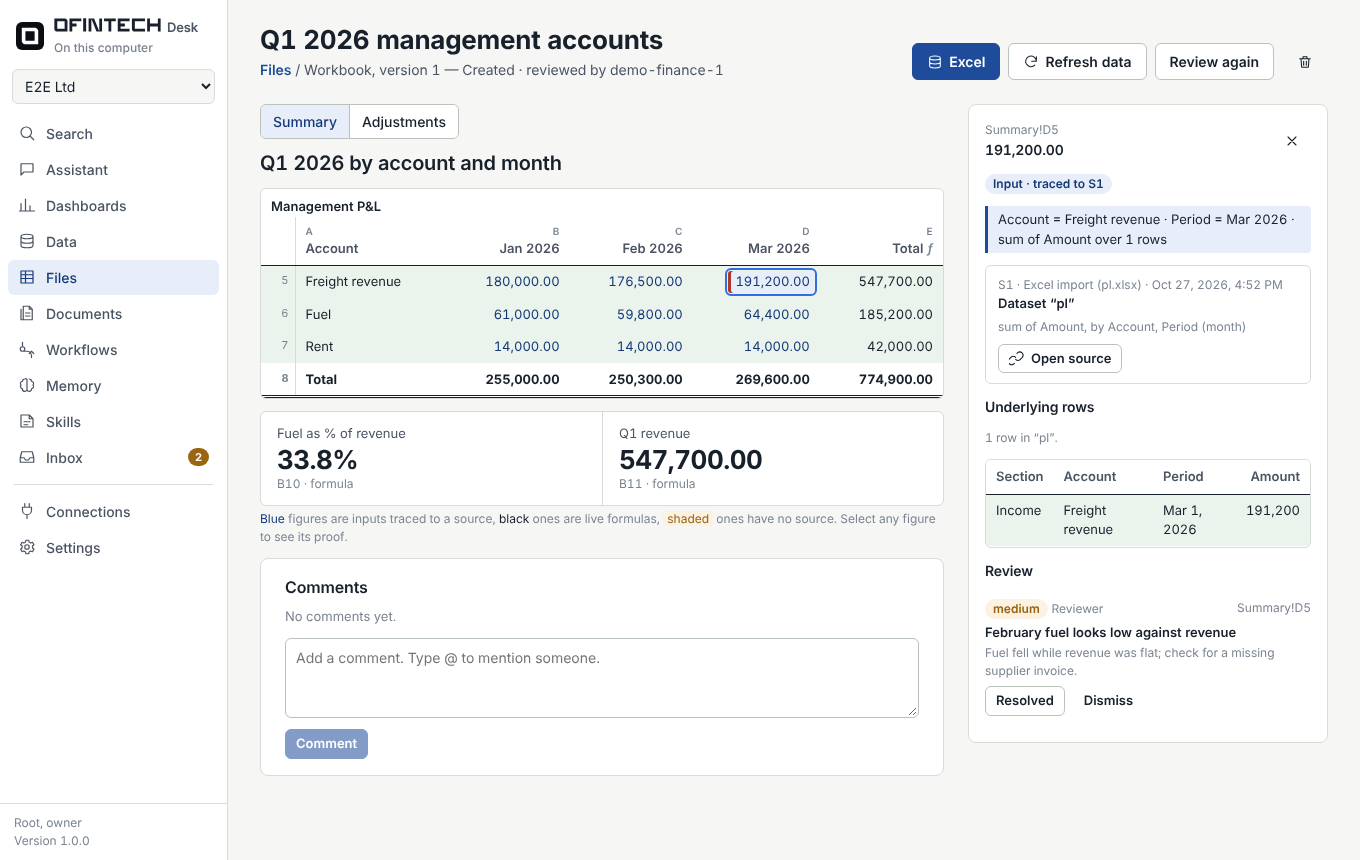
A workbook in OfinTech Desk: selecting the March freight revenue figure shows its source dataset, the underlying row and a reviewer's finding
Select any figure: its source, the rows behind it and the reviewer's notes appear beside it.

Who it is for

One workspace, three jobs

The same ledger, read three ways: the decision, the close, and the question asked on the way to a meeting.

CFOs and finance directors

Decide on numbers you can defend

  • 35 KPIs against your own targets, not a benchmark: growth, margins, liquidity, working capital, leverage and cash flow, each with a target and a warning level you set.
  • Forecasts you approve and freeze. Draft, submitted, approved; only the finance lead makes a forecast the plan, and the plan feeds the revenue against plan and forecast accuracy KPIs.
  • The month cash runs out, from your assumptions on sales, costs, receivable and payable days, capital spending and debt.
  • Board packs with evidence. Every figure in a report opens to its source; figures without one are shaded, and a second model reviews each file.
  • Your data stays yours. Self-hosted, read-only connections to the ledger, any model provider, and an audit log of every decision.

Ask the assistant“Which KPIs moved against target this month, and what is behind the drop in gross margin?”
Financial analysis · Forecasting

Accountants and controllers

Close faster, with the file you already use

  • Your own Excel and Word files. Attach last month's pack or the company template; the assistant fills it in, keeps your layout and formulas, and saves a new version.
  • A general ledger template to fill in or export to, one row per journal line, uploaded under Cost centres. Entries that do not balance are named before anything is built.
  • Cost centres by rule: tags, accounts, suppliers, words and dates, so projects can be followed in books that were never tagged.
  • Account roles suggested from account names in English, Arabic, Spanish or French, and confirmed by you.
  • The month-end close, prepared overnight: missing accruals and depreciation proposed with the lines behind them, the bank matched to its statement, variances to explain. You approve; nothing is posted for you.
  • Workflows for the close: month-end pack, receivables follow-up and bills due, on a schedule, from an e-mail or from another system's webhook.

Ask the assistant“Fill in the March management accounts from the ledger and flag anything you could not trace.”

Month-end close · Cost centres

Executive managers

Ask in plain language, get a cited answer

  • A question, not a report request. Ask in English, Arabic, Spanish or French; the answer names the documents, KPIs and ledger lines it used.
  • Projects and departments with cost to date, cash actually paid, unpaid supplier bills, and the date the budget runs out at the current pace.
  • Dashboards from synced ledgers and imported files, and one search across documents, conversations and data.
  • Approvals in one inbox. E-mails, messages and workflow runs wait for a person; you see exactly what will be sent before it goes.
  • From the chat app you already use: link Telegram or WhatsApp with a one-time code and ask from your phone.

Ask the assistant“How much has the warehouse fit-out cost so far, and when does its budget run out?”

Cost centres · Connections and webhooks

Features

From the general ledger to the decision

OfinTech Desk turns the ledger into the numbers a finance lead acts on: KPIs against targets, forecasts you approve, cost centres that follow a project through the journal and the bank, and connections to the systems around you. Every value opens up to the accounts and lines behind it.

Financial analysis

35 KPIs on your targets, not a benchmark

Growth and profitability, liquidity, working capital, leverage, cash flow, and cost and control, computed in code from the general ledger. The finance lead sets a target and a warning level for each one, and the card shows on target, watch or act.

  • Any chart of accounts. Each account gets a role such as cash, debt, payroll or depreciation, suggested from its name and confirmed by a person.
  • Formulas you can read and change. DSO is receivables / SUMN(revenue, 3) * 91.25. Edit any formula or add KPIs of your own.
  • Open any value to see its 24-month history, the measures in the formula and the ledger accounts behind them.
  • Real balances. Month-end balances are rebuilt from the synced balance sheet; cash flow is split into operating, investing and financing.
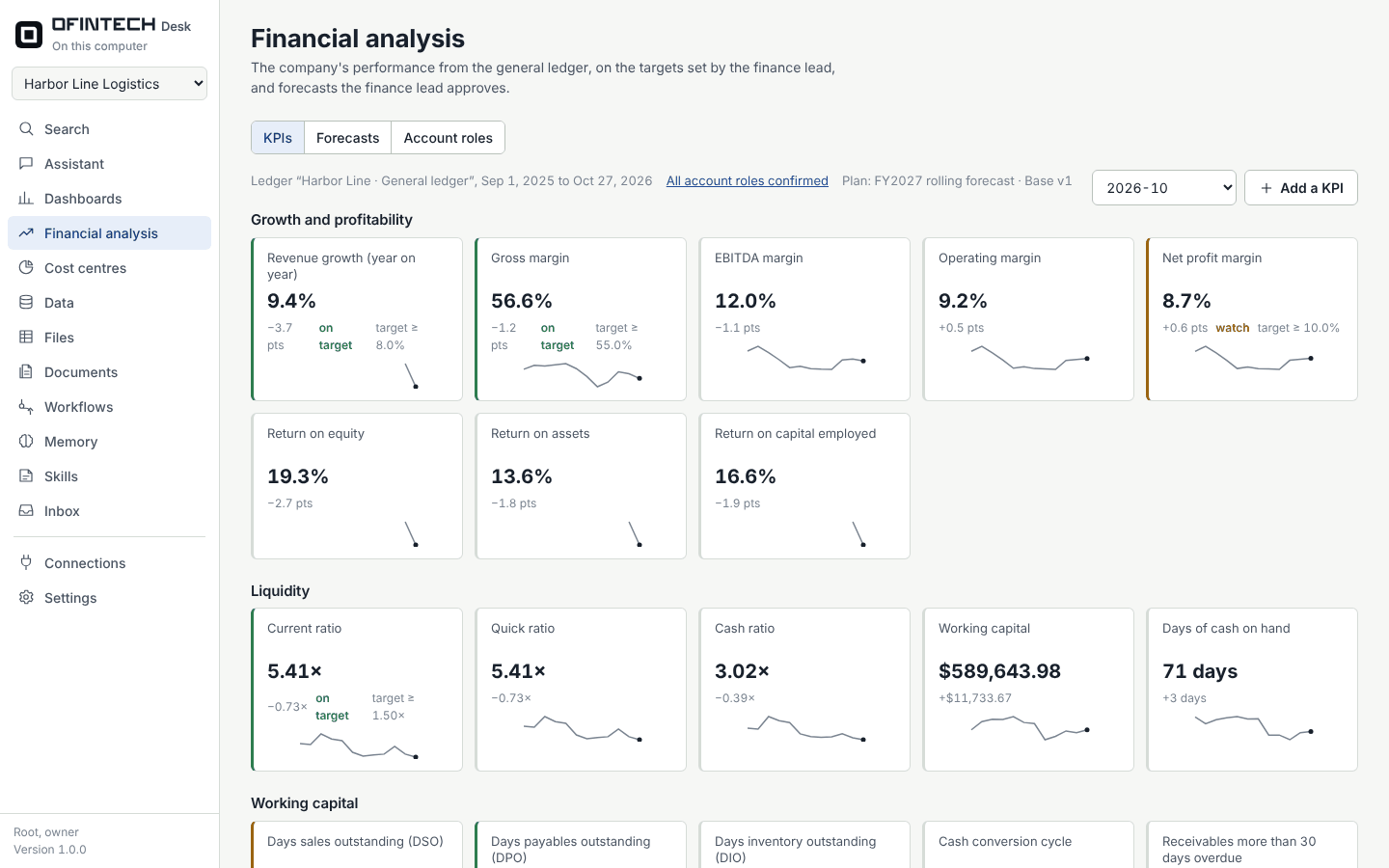
The KPI scorecard for the demo company: revenue growth 9.4% and gross margin 56.6% on target, net margin 8.7% to watch, current ratio 5.41
The scorecard for Harbor Line Logistics, the demo company, with targets set by its finance lead.

Growth and profitability

Revenue growth, gross, EBITDA, operating and net margins, return on equity, assets and capital employed.

Liquidity

Current, quick and cash ratios, working capital, days of cash on hand.

Working capital

DSO, DPO, DIO, cash conversion cycle, overdue receivables and payables, collection rate.

Leverage

Debt to equity, net debt to EBITDA, interest cover, debt service coverage, equity ratio.

Cash flow

Operating and free cash flow, cash runway, cash conversion of profit.

Cost and control

Opex and payroll to revenue, margin of safety, revenue against plan, forecast accuracy, customer concentration.

Forecasting

Your assumptions, our arithmetic, the CFO's approval

Choose a method for every P&L line: growth, same month last year, a percentage of another line, an average, a trend, a fixed amount or month by month. Add receivable, inventory and payable days, capital spending and debt repayment. The forecast projects profit, working capital and cash, and names the month cash would run out.

  • Scenarios and versions, compared side by side.
  • Draft → submitted → approved. Only the finance lead approves or makes a forecast the plan, and approved figures are frozen.
  • The plan feeds the revenue against plan and forecast accuracy KPIs, and each approved forecast shows its error and bias as months close.
  • A statistical forecast (Holt or Holt-Winters) is drawn next to yours, with its measured error, as a check. It never replaces your assumptions.
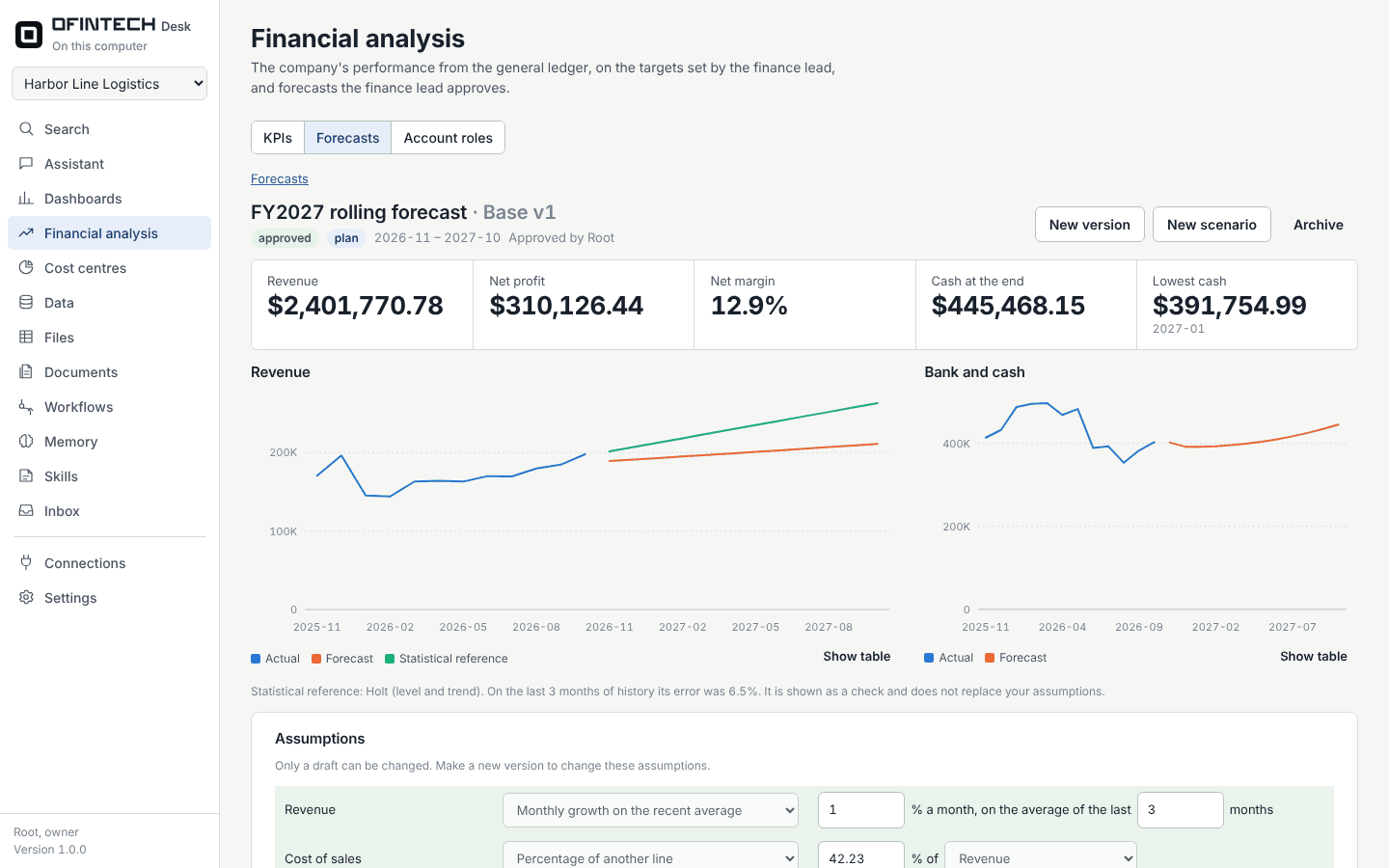
An approved twelve-month forecast that is the plan: revenue 2.4 million, net profit 310 thousand, lowest cash in January 2027, with the actual, forecast and statistical revenue lines
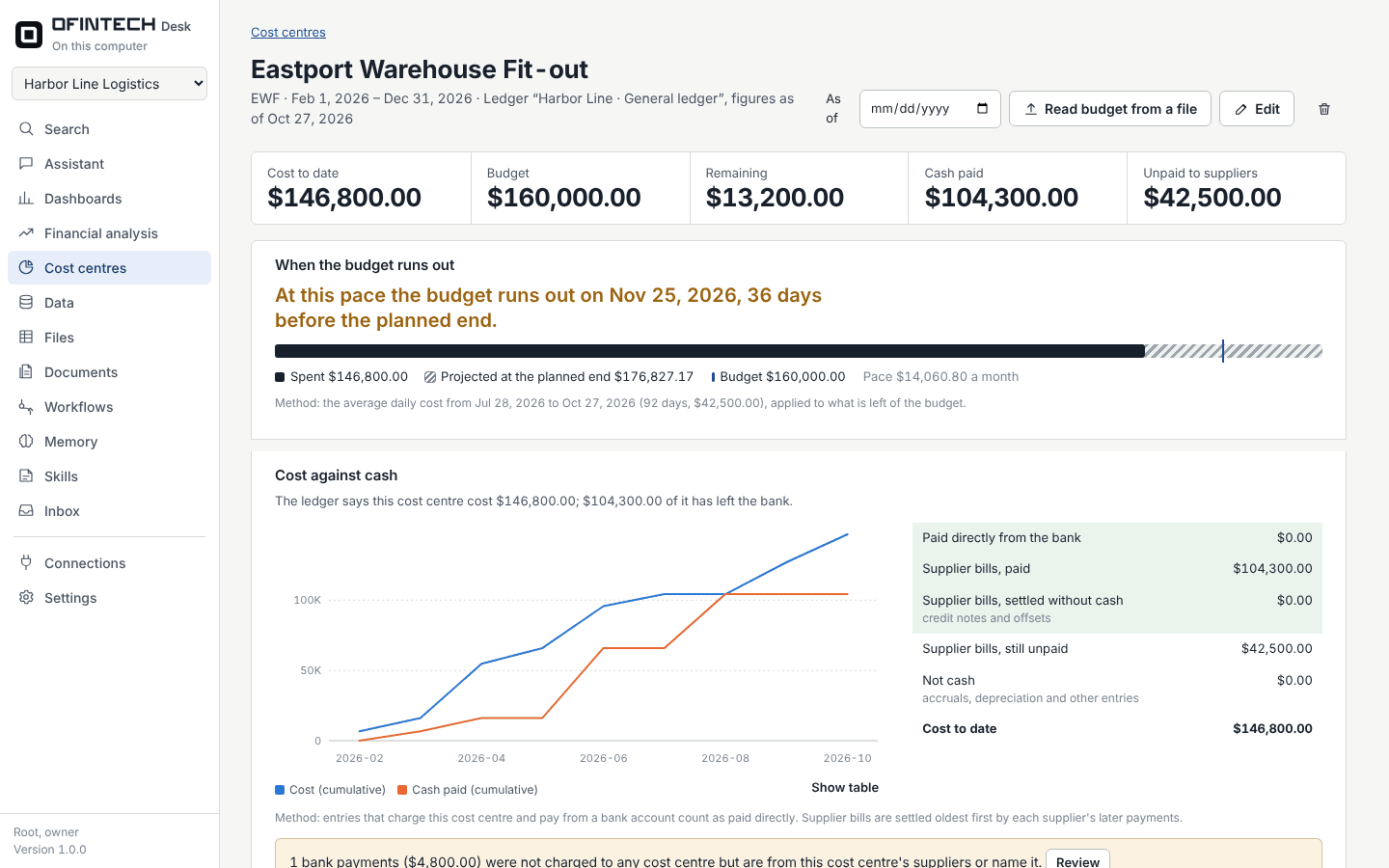
A warehouse fit-out project: cost to date 146,800 against a budget of 160,000, with the budget running out on 25 November 2026, 36 days before the planned end

Cost centres

Follow a project through the ledger, the journal and the bank

  • Rules instead of a ledger field. Combine tags, accounts, suppliers, words and dates, so it works on books that were never tagged. The untagged share shows how much a rule picked up rather than a tag.
  • Cost against cash. What was paid directly, which supplier bills are paid or still unpaid, and which bank payments may belong to the project.
  • The date the budget runs out at the current pace, overall and for each budget line.
  • Budgets from your own file. Read from the Excel or Word file the team already uses; every line keeps the cell it came from.

Templates to fill in, and a ledger upload

Two Excel templates download from the Cost centres page, with a guide sheet and drop-down lists in each:

  • General ledger template: one row per journal line, with date, entry, type, account code and name, account class, debit, credit, description, party and cost-centre tags. Fill it in, or export your ledger with the same columns.
  • Budget template: code, item, amount and notes, with a total line. Read it into a cost centre and each line is matched to ledger accounts by code or name.

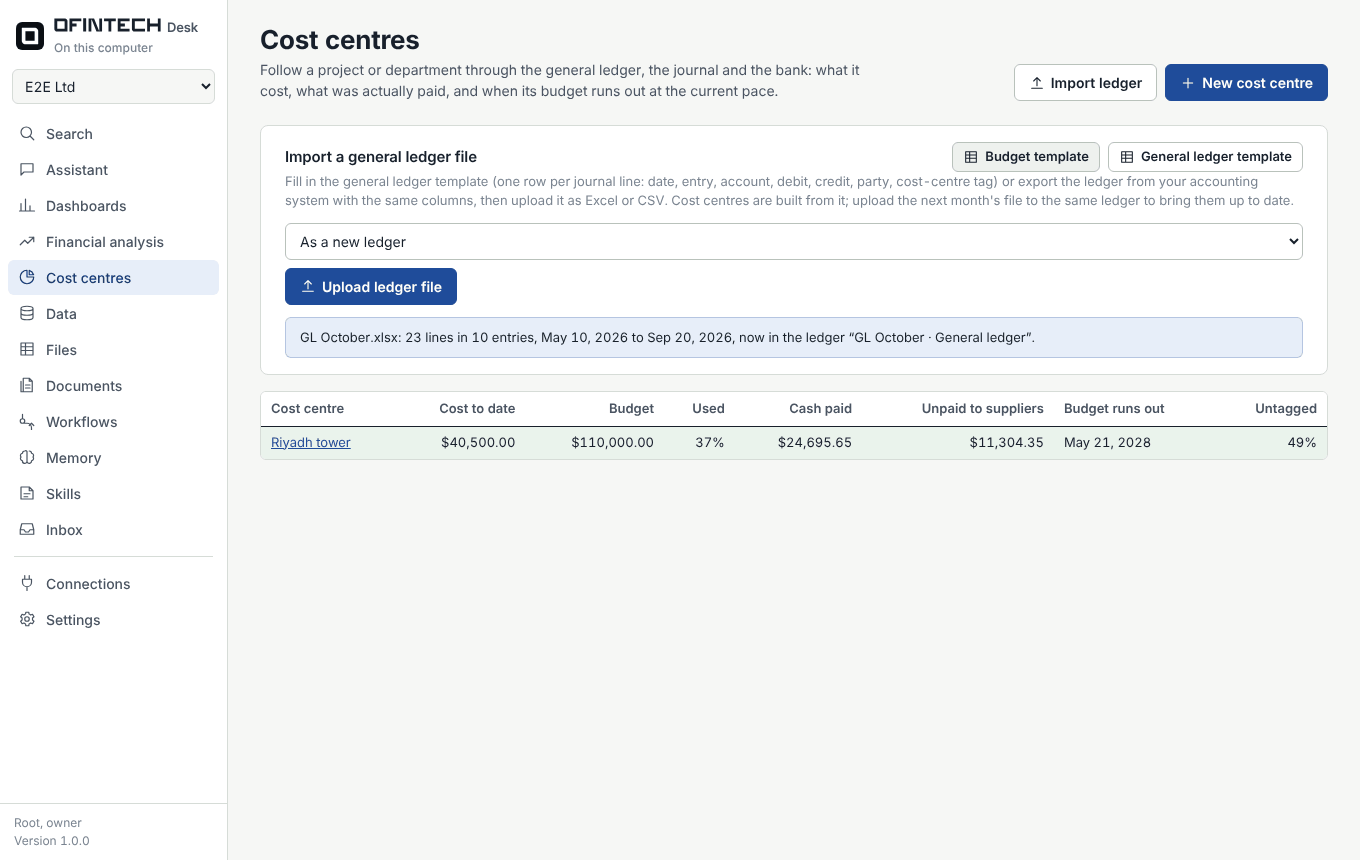
Upload the ledger as Excel or CSV. The upload reports the lines, entries and dates it found and names any entry whose debits and credits differ. Next month, upload the new export to the same ledger and every cost centre built on it is brought up to date.

The Cost centres page with the Import a general ledger file panel: template downloads, a ledger to replace, the upload button, and the result of an upload: 23 lines in 10 entries
After an upload: how many lines and entries were read, the dates they cover, and the ledger they went into.

Month-end close

The close, prepared while you sleep

At 2 a.m. on the 1st, OfinTech Desk reads last month's ledger and lays out what is left before the month can be closed. In the morning the finance team decides; nothing is posted to the accounting system for them.

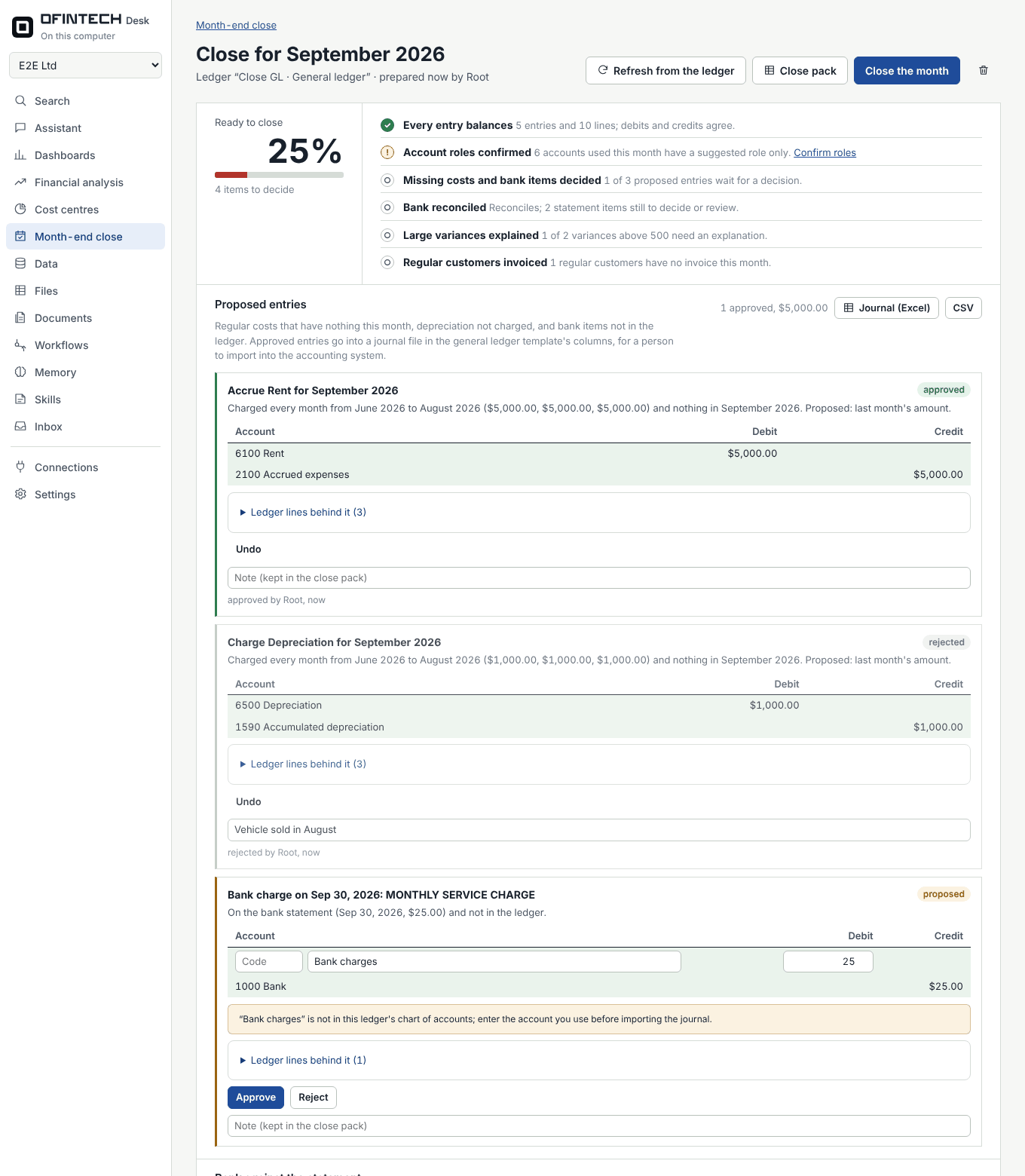
  • Missing costs. Rent, salaries, subscriptions or depreciation charged every month and absent this month are proposed as entries, with the three previous months as evidence.
  • The bank against its statement. Upload the statement; lines are matched by amount and date, cheques not yet cleared and bank charges are set out, and the unexplained difference is shown, not hidden.
  • What moved. Accounts that moved more than materiality and 20% against the last three months, each with the entries behind it, wait for a one-line explanation.
  • A journal and a close pack. Approved entries download as a journal to import; the close pack workbook links every figure to its ledger lines. The finance lead closes the month, and it is frozen.
The month-end close for September: 25% ready, a rent accrual approved, depreciation rejected with a reason, a bank charge proposed, and the bank reconciled to the statement with no unexplained difference
September's close: an accrual approved, depreciation rejected with its reason, and the bank reconciled to zero.

Connections and webhooks

Connected to the systems around the ledger

QuickBooks Online, Xero, Zoho Books and Odoo sync read-only. Gmail, Drive and Sheets, Telegram and WhatsApp, PipesHub for scanned documents, and any Model Context Protocol server give the assistant more to work with, each tool asking for approval unless you allow it to run on its own.

Webhooks, under Connections, link anything with HTTPS:

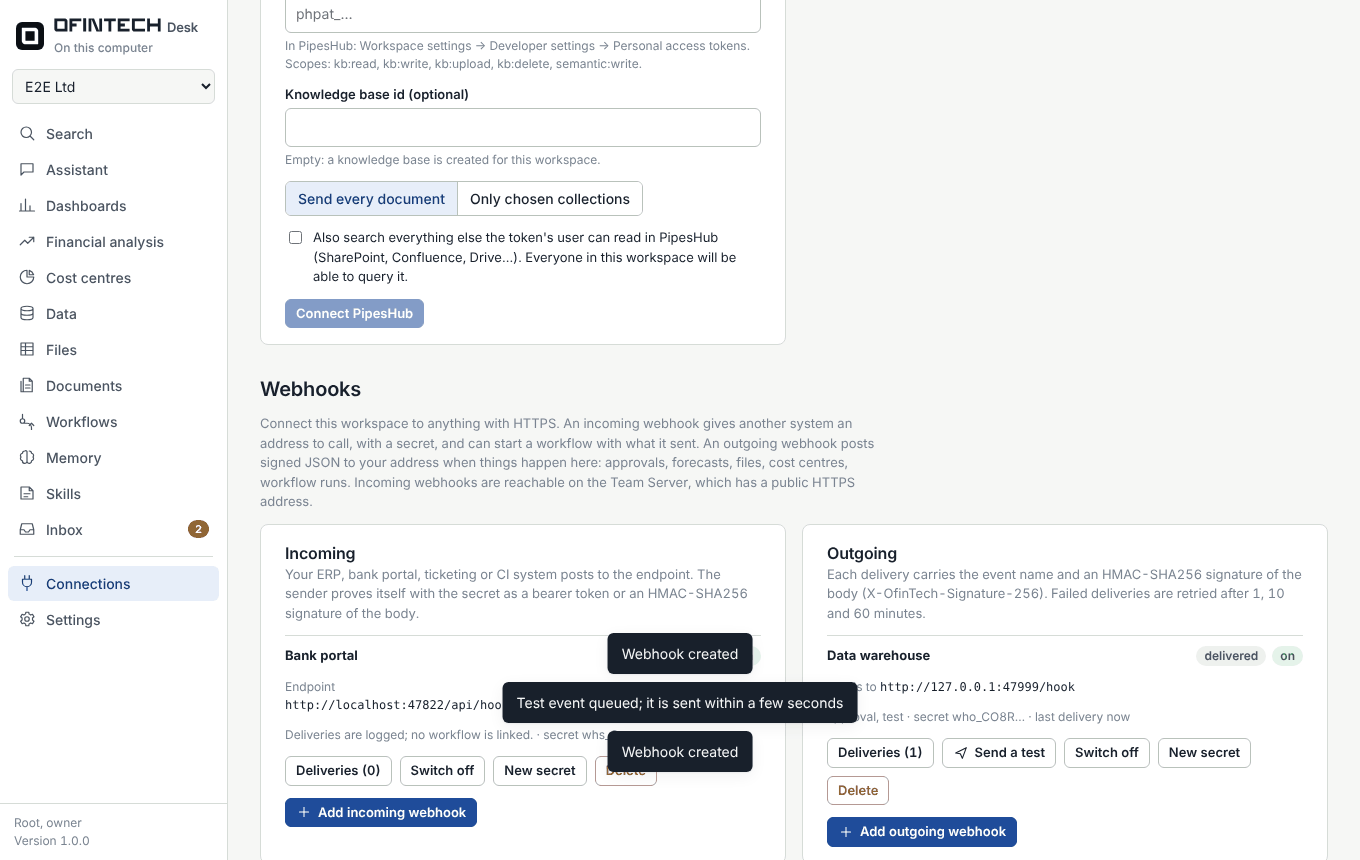
  • Incoming: an address for your ERP, bank portal, ticketing or CI system to call, with a secret it presents as a bearer token or an HMAC-SHA256 signature. A delivery can start a workflow with the JSON it carried; the workflow's own approval steps still apply.
  • Outgoing: signed JSON posted to your address when things happen here: approvals decided, forecasts approved, files revised, cost centres changed, workflow runs finished. Choose the event groups; failed deliveries are retried after 1, 10 and 60 minutes.
  • Secrets are shown once and stored encrypted; every delivery is logged with its response and can be sent again.
The Webhooks section of the Connections page: an incoming webhook named Bank portal with its endpoint, and an outgoing webhook named Data warehouse whose test event was delivered
An incoming webhook with its endpoint, and an outgoing one whose test event was delivered and signed.

The workspace

Built for work that someone will audit

The assistant is useful only if you can check it. Every feature is designed so a controller can see where a number came from and who approved what.

Evidence-linked workbooks and reports

Inputs drill down to the rows they came from, totals are live Excel formulas, and figures without a source are shaded. A separate reviewer model checks each file without seeing the conversation.

Your own Excel and Word files

Attach a company template or last month's pack. The assistant fills it in, keeps your layout and formulas, saves a new version and highlights any figure it cannot trace.

Approvals before anything leaves

E-mails, chat messages, workflow runs and external tools wait for an editor to approve the exact content. Every decision is in the audit log.

Memory you approve

The assistant proposes lasting facts such as a materiality threshold or an account mapping; nothing is kept until a person saves it. Each answer shows which memories it used.

One search with citations

Documents (scans read with OCR), past conversations, memory, files and data in one place, with a short answer that cites the page it came from.

Workflows for the close

Month-end packs, receivables follow-up and bills due, on a schedule, from an e-mail or from a webhook, with retries and a timeline of every run.

Any model, fewer tokens

OpenAI, Anthropic, Gemini, DeepSeek, Mistral, Azure or a local model through Ollama. Requests carry only the tools they need and are ordered for prompt caching.

Four languages, right to left

English, Arabic, Spanish and French, chosen per person. Arabic is set in IBM Plex Sans Arabic and laid out right to left; the assistant answers in the language you write in.

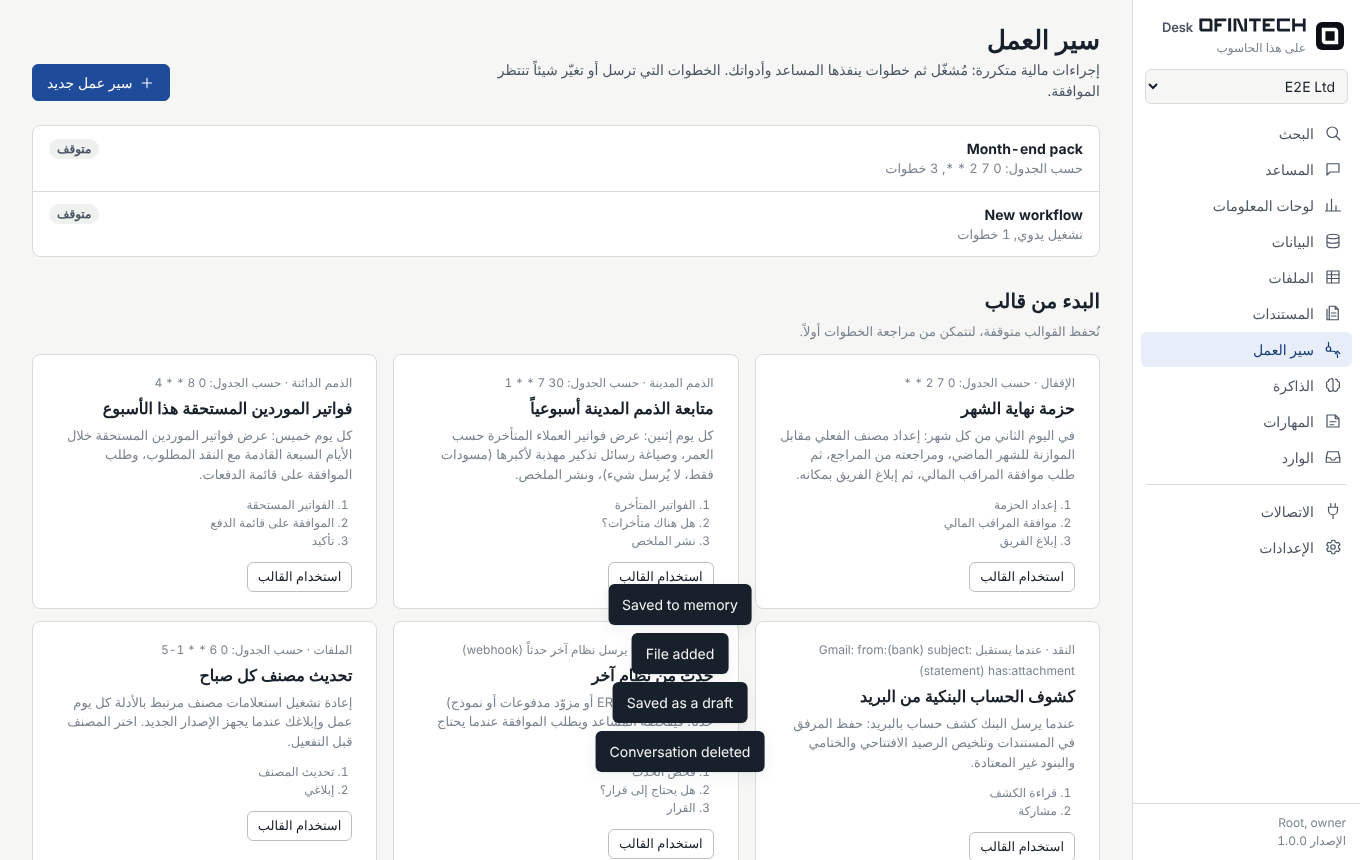
The Workflows page in Arabic, laid out right to left, with templates for the month-end pack and receivables follow-up
The whole interface in Arabic Arabic switches the layout to right to left; figures keep Western digits, as in most finance reports. Workflow templates appear in each person's language.

Latest changes

What is new in OfinTech Desk

Version 1.0, October 2026. The full list is in the changelog.

Month-end close

Missing accruals and depreciation proposed, the bank reconciled to its statement, variances to explain, a journal to import, and a workflow that prepares it overnight.

Webhooks under Connections

Incoming endpoints that can start a workflow, outgoing event subscriptions with signed deliveries, a delivery log and retries.

Ledger upload and templates

A general ledger template and a budget template to fill in, and a ledger upload under Cost centres that checks every entry balances.

Sign in from ofintech.ai

Sign in, create an account or continue with Google from this page; the session opens at desk.ofintech.ai.

Financial analysis

35 KPIs with targets and warning levels, editable formulas, drill-down to the ledger, and account roles suggested in four languages.

Forecasting

Seven methods per P&L line, working-capital days, capital spending and debt; approval, versions, and accuracy tracked against actuals.

Cost centres

Projects and departments followed by rule through the ledger, the journal and the bank, with the date the budget runs out.

Demo company

Harbor Line Logistics: fourteen months of books as Zoho Books import files and as a general ledger, with the figures you should see.

Arabic typography

IBM Plex Sans Arabic bundled with the app, so Arabic reads well offline and under the strict content security policy.

Try it

Fourteen months of books to explore

Harbor Line Logistics is a fictional freight company with 182 invoices, 98 bills, payments, journals and a warehouse project that runs over budget. It comes as Zoho Books import files and as a general ledger for OfinTech Desk, with a guide and the figures you should see.

Your account

Sign in or create your account

Both forms are sent straight to the product at desk.ofintech.ai, which signs you in and opens your workspace. Nothing about your account is stored by this website.

Sessions are an HttpOnly, same-site cookie set by desk.ofintech.ai; passwords are hashed there and never seen by this site. Sign-in attempts are rate-limited. Running your own Team Server? Set DESK_SITE_URL to your website and the same forms work for you; see docs/DEPLOYMENT.md.

Install

Run it on your own server or computer

Most teams run the Team Server and give everyone the desktop app. Your data stays on your infrastructure; the only outside calls go to the model provider and the systems you connect.

For a team

Team Server

Docker Compose with automatic HTTPS. Accounts, invitations, roles, approvals inbox, webhooks, sign-in from your website.

For each person

Desktop app

macOS and Windows client of your Team Server, or a standalone app with its own engine on one computer.

For contributors

From source

Python 3.11+ and Node.js 22+. Engine, UI and tests in one repository.

Team Server on Ubuntu 24.04

You need a server with 2 vCPU and 4 GB of RAM (up to 25 people), a DNS A record for your domain pointing at it, and ports 80 and 443 open.

  1. Install Docker and Compose

    sudo apt update && sudo apt install -y ca-certificates curl
    sudo install -m 0755 -d /etc/apt/keyrings
    sudo curl -fsSL https://download.docker.com/linux/ubuntu/gpg -o /etc/apt/keyrings/docker.asc
    echo "deb [arch=$(dpkg --print-architecture) signed-by=/etc/apt/keyrings/docker.asc] \
      https://download.docker.com/linux/ubuntu $(. /etc/os-release && echo $VERSION_CODENAME) stable" \
      | sudo tee /etc/apt/sources.list.d/docker.list
    sudo apt update && sudo apt install -y docker-ce docker-ce-cli containerd.io docker-compose-plugin
  2. Get the code and create the settings file

    git clone https://github.com/OfinTech/ofinTech-Dask.git
    cd ofinTech-Dask/server
    cp .env.example .env && chmod 600 .env
  3. Generate the master key

    It encrypts every stored credential and file. Keep a copy in a password manager, separate from your backups.

    KEY=$(python3 -c 'import secrets,base64;print(base64.urlsafe_b64encode(secrets.token_bytes(32)).decode())')
    sed -i "s|^DESK_MASTER_KEY=.*|DESK_MASTER_KEY=$KEY|" .env
  4. Set your domain, website, e-mail and sign-in

    # .env
    DESK_DOMAIN=desk.yourcompany.com
    ACME_EMAIL=it@yourcompany.com
    DESK_OPEN_SIGNUP=false                # invitation only
    DESK_SITE_URL=https://yourcompany.com # optional: a website whose forms sign people in
    
    # optional: invitations and password resets by e-mail
    DESK_SMTP_HOST=smtp.yourprovider.com
    DESK_SMTP_USER=desk@yourcompany.com
    DESK_SMTP_PASSWORD=...
    DESK_SMTP_FROM=OfinTech Desk <desk@yourcompany.com>
    
    # optional: "Continue with Google", limited to your domain
    DESK_GOOGLE_CLIENT_ID=...
    DESK_GOOGLE_CLIENT_SECRET=...
    DESK_GOOGLE_ALLOWED_DOMAINS=yourcompany.com
  5. Start it and create the administrator

    docker compose up -d --build
    docker compose logs -f engine      # wait for: Uvicorn running on http://0.0.0.0:8700

    Open your domain. The first account becomes the administrator, so create it straight away. Then add a model provider under Settings → Models and invite colleagues under Settings → Members.

  6. Back up every night

    ./backup.sh                        # backups/<timestamp>.sqlite3 with a checksum
    # crontab -e
    0 2 * * * cd /path/to/ofinTech-Dask/server && ./backup.sh

    Optional: keep files in MinIO or any S3 store with -f docker-compose.minio.yml. Full checklist in docs/DEPLOYMENT.md.

Desktop app for macOS and Windows

The desktop client opens your Team Server (by default https://desk.ofintech.ai). GitHub Actions builds the installers: open Actions → desktop-cloud → Run workflow, or push a tag.

git tag desk-v1.0.0 && git push origin desk-v1.0.0
# → OfinTech-Desk-1.0.0-mac-arm64.dmg, …-mac-x64.dmg, …-win-x64.exe

Sign the builds with an Apple Developer ID and a Windows code-signing certificate so they install without warnings. See docs/DESKTOP.md.

From source, on one computer

The standalone app runs its own engine on 127.0.0.1 and keeps its key in the operating system's secure storage.

pip install -r engine/requirements.txt
(cd ui && npm install && node build.mjs)
(cd desktop && npm install && npm start)

# tests
cd engine && python -m unittest discover -s tests -t .

Connect a ledger

Works with any accounting system

Four systems connect out of the box. Anything else, from Tally and Sage to SAP Business One or your own database, links through the Open Accounting Connector, a small documented API, or arrives as a general ledger file through the template above. Every connection is read-only.

SystemHow it connectsWhat you need
QuickBooks OnlineOAuth 2.0An Intuit developer app; redirect URI https://<domain>/oauth/callback
XeroOAuth 2.0 with PKCEA Xero app with the granular accounting scopes
Zoho BooksOAuth 2.0, every data centreA Zoho API console client
Odoo 17 or laterJSON-2 API (19+), JSON-RPC (17, 18)The Odoo address and an API key of a user with read access to Accounting
Any other systemOpen Accounting Connector, pull or pushAn adapter with five read-only endpoints, or a script that posts JSON
A ledger exportExcel or CSV upload under Cost centresThe general ledger template's columns, one row per journal line

Each connection syncs profit and loss by month, the balance sheet, invoices and bills into datasets, with ready-made dashboards. Set it up under Connections → Accounting (admin role).

Pull

OfinTech Desk reads your adapter

For a live system with an API or a database you can query. You run a small HTTPS service; OfinTech Desk calls it on every sync and when the assistant reads a report.

GET /v1/company
GET /v1/profit-and-loss?start=2026-01-01&end=2026-03-31
GET /v1/balance-sheet?as_of=2026-03-31
GET /v1/invoices?status=open|all
GET /v1/bills?status=open|all

Authorization: Bearer <adapter key>
  1. Copy examples/accounting-adapter/adapter.py (standard library only).
  2. Replace its four data functions with queries against your system, using a read-only user.
  3. Serve it over HTTPS, then add Other accounting system → Pull with its address and key.

Push

Your system sends JSON

For systems behind a firewall or without an API: a nightly export posts to the Team Server. Nothing is opened towards your network.

curl -X POST \
  https://desk.yourcompany.com/api/ingest/v1/accounting/profit-and-loss \
  -H "Authorization: Bearer odk_…" \
  -H "Content-Type: application/json" \
  -d '{"lines":[{"period":"2026-03-01","section":"Income",
       "account":"4000 Sales","amount":53000}]}'
# → {"kind":"profit-and-loss","rows":2,"dataset_id":"ds_…"}
  1. Add Other accounting system → Push and copy the ingest key; it is shown once.
  2. Post company, profit-and-loss, balance-sheet, invoices and bills.
  3. Each post replaces that data set; send the full history you want to analyse.

The full specification is an OpenAPI 3.1 file, ready for Swagger UI or Postman: docs/openapi/accounting-connector.json. Guides: docs/ACCOUNTING_API.md, docs/WEBHOOKS.md, docs/COST_CENTRES.md.

Plainly stated

What it does not claim

  • KPIs and forecasts are management figures computed from your ledger. They are not audited statements and not financial advice; there are no industry benchmarks, only your own targets and history.
  • Tax, accounting and regulatory output is general guidance. No certification or compliance is claimed for e-invoicing, data protection laws or any regulator.
  • Accounting connectors read data; they do not post entries. Cash comes from the ledger's bank lines; there is no live bank connection.
  • The independent reviewer is a second model check, not an audit. Test every connection against a sandbox company before using it with real books.